Equity Register:
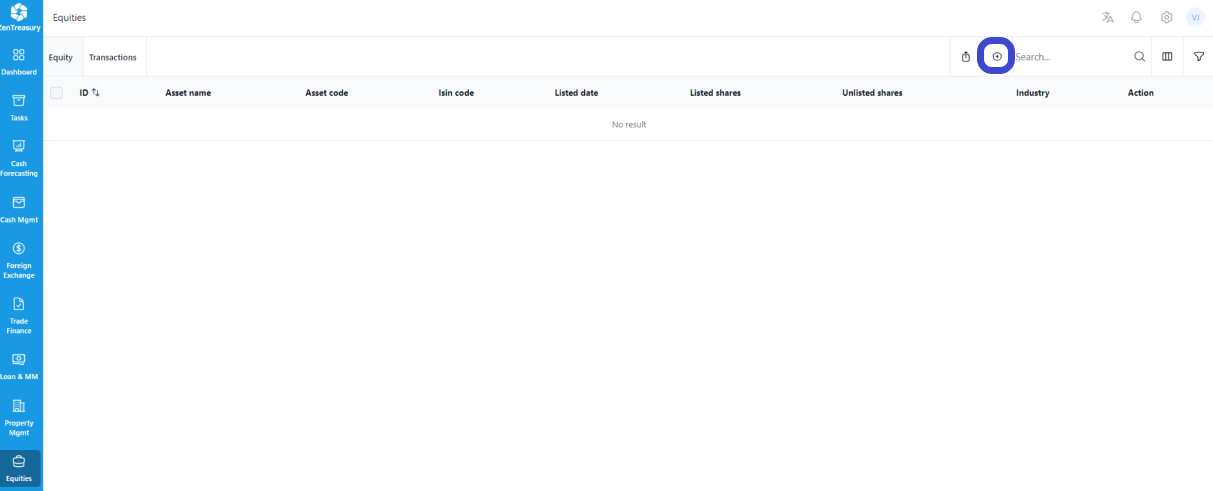
The Equity Register maintains a comprehensive list of all equities owned by the company, such as stocks purchased.
Adding an Equity:
To add a new equity to the register, click the '+' icon located at the top right of the page.
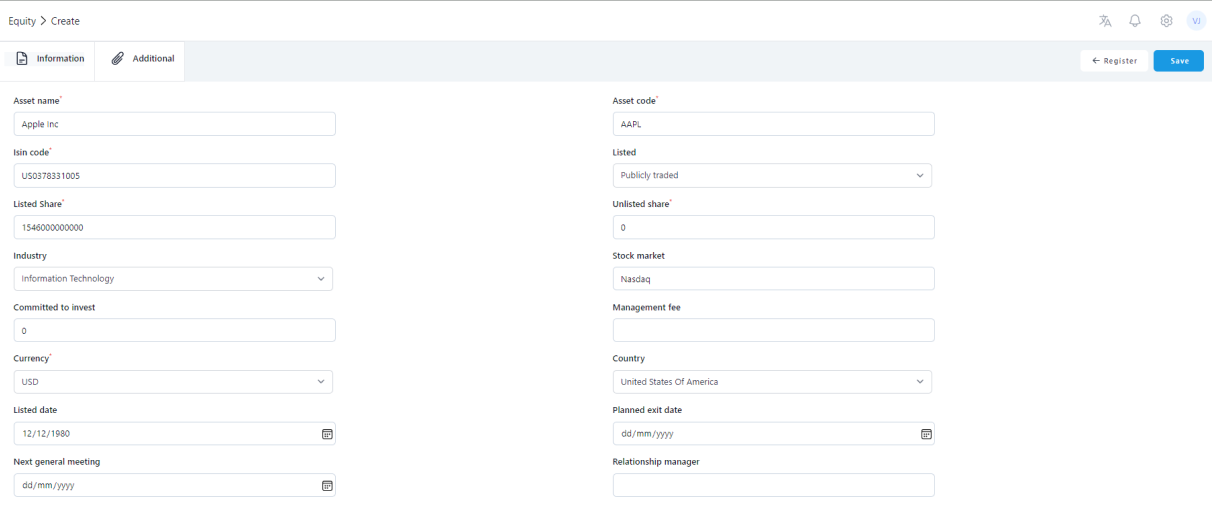
When adding an equity, it is mandatory to specify the quantity of both listed and unlisted shares. This information is crucial for saving the entry correctly. Fill in the required information and click 'Save' to add the equity to the register.
The amount of listed shares or unlisted shares have to be filled to be able to save the form. The 'Additional' tab in the equity register allows for the inclusion of supplementary details about the equity. Here, you can add rates and any notes related to the equity. Fill in the needed information and click 'Save'.
NOTE:
For detailed procedures on recording purchase information, dividend transactions, sales, and other equity-related transactions, refer to the 'Equity Transactions' tab. Further instructions on these processes can be found in a separate article dedicated to Equity Transactions.
Was this article helpful?
That’s Great!
Thank you for your feedback
Sorry! We couldn't be helpful
Thank you for your feedback
Feedback sent
We appreciate your effort and will try to fix the article