Foreign exchange (FX) rates can be entered into the system either manually or automatically, with options for automation from sources like the European Central Bank (ECB) or the Swedish Riksbank.
To set up automated retrieval of FX rates from the ECB or Riksbank, please send a request to ZenTreasury Support at support@zentreasury.com.
Setting up the FX rates manually:
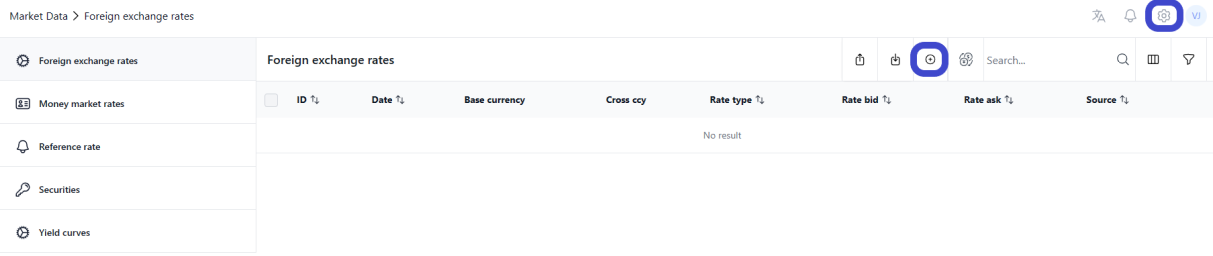
1. Navigate to the settings by clicking on the cogwheel icon at the top right corner of the screen. Go to 'Market Data' > 'Foreign Exchange Rates'. Click the '+' icon to add a new rate.
2. Enter rate details:
- Rate Type: Specify the type of rate you are entering (e.g., spot, forward).
- Date: Enter the date for which the rate is applicable.
- Currency Details: Select the currency pair for the rate. The dropdown will only show currencies that have been activated under 'Settings > Common Data > Currencies'.
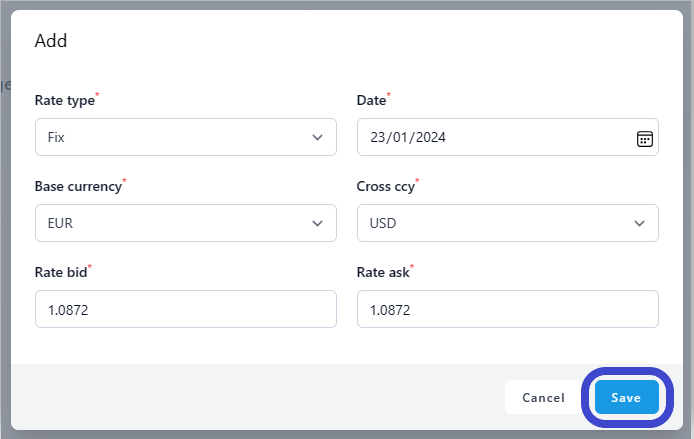
- Saving the Rate: After filling in the necessary information, click 'Save'. The entered data will then be displayed in the FX rates register.
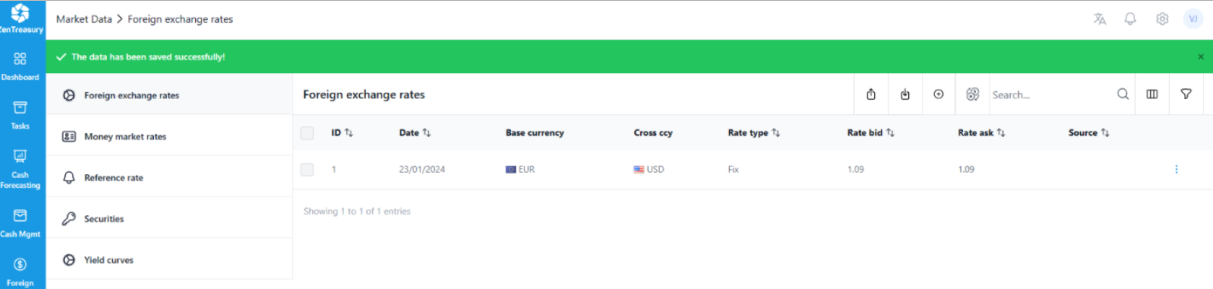
- Add all needed rates for the currencies in use. For example the Foreign exchange realised/unrealised reports will need the rates for the trade/effective date and the month-end rate for the valuation to be calculated.
Was this article helpful?
That’s Great!
Thank you for your feedback
Sorry! We couldn't be helpful
Thank you for your feedback
Feedback sent
We appreciate your effort and will try to fix the article