Loan breakdown report offers detailed overview of your loans and investments based on selected date ranges.
Generating the Loan Breakdown Report
Date Selection: This report is generated based on the start and end dates you select. It will list all your loans and investments within this timeframe.
Currency Conversion: By default, all values in the report are converted to the entity's base currency. However, you can select a different currency to convert the loan values accordingly, using the end date market rate. This is contingent on the availability of the currency rate under Settings > Market data > Foreign exchange rates.
Filtering Options: You have access to various filtering options, allowing you to refine the report by entity, portfolio, counterparty, or even specific loan IDs.
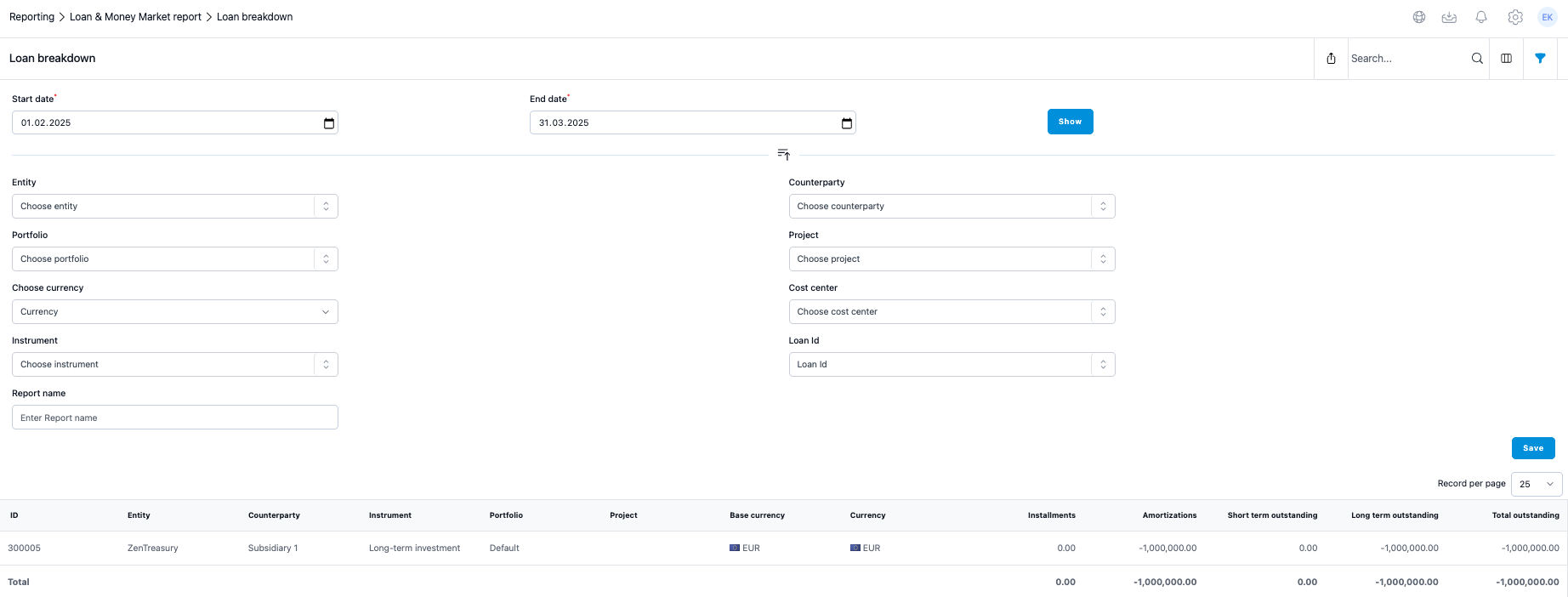
Columns explained
Installments: This column aggregates all positive capital payments (viewed from the entity's perspective), from the period selected for the report.
Amortizations: This column will summarise all negative capital payments (from an entity point of view) from the period selected for the report.
Short Term Outstanding: This column calculates the total capital payments due within the next 12 months from the report's end date.
Long Term Outstanding: This column sums all capital payments due after the short-term period (beyond 12 months from the end date).
Total Outstanding: This column shows the total outstanding loan/investment balance from the end date of the report.
Was this article helpful?
That’s Great!
Thank you for your feedback
Sorry! We couldn't be helpful
Thank you for your feedback
Feedback sent
We appreciate your effort and will try to fix the article