Loan accounting can be done using the standard reports. Here we will further explain how to use these standard reports to create postings, or to take a look at loan balances and also learn more about gathering data for your financial notes.
Default Currency Settings
Without specifying a currency in the dropdown, all values listed as 'in base ccy' (base currency) are automatically converted to the entity's base currency.
Currency Selection
By choosing a specific currency from the dropdown menu, the numbers in base currency will be converted into the selected currency. This conversion relies on the availability of the foreign exchange rate for the selected currency, that are found in Settings > Market data > Foreign exchange rates.
Generating Reports
Reports can be generated directly in the view. After selecting the parameters for your report, simply click "Show" to display the data on the screen.
Export Options
You have the option to export the report in Excel, CSV or print by clicking the export icon located at the top right, next to the search bar.

Report columns
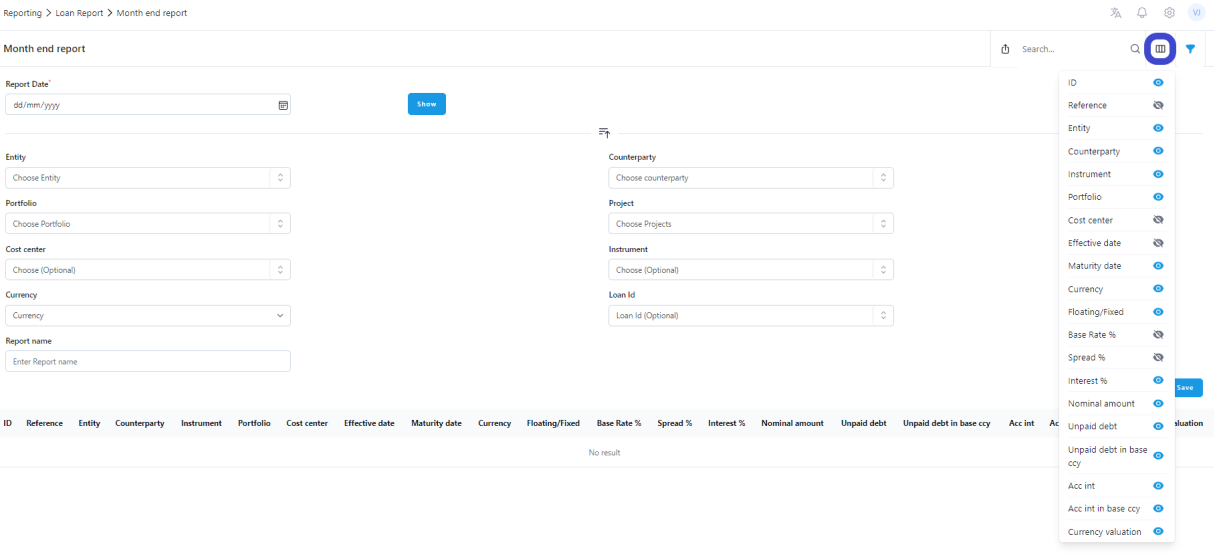
Some of the reports have several columns. If you prefer to have less columns, you can hide columns under 'Column visibility'. This way you can present only the preferred information on report and can run more detailed report separately if needed.
 Report library
ZenTreasury enables you to save custom reports for future access. To save a report, make the necessary selections, enter a name for the report in the 'Report name' field and click 'Save'. The report will be stored in the Report library.
To access and run a saved report, navigate to the Report library, run the report and locate the report in the Report archive. Saved reports can be customized based on various criteria such as entity, portfolio, or counterparty. The selections made will be retained, and the only parameter that needs updating for future use is the date.
Was this article helpful?
That’s Great!
Thank you for your feedback
Sorry! We couldn't be helpful
Thank you for your feedback
Feedback sent
We appreciate your effort and will try to fix the article