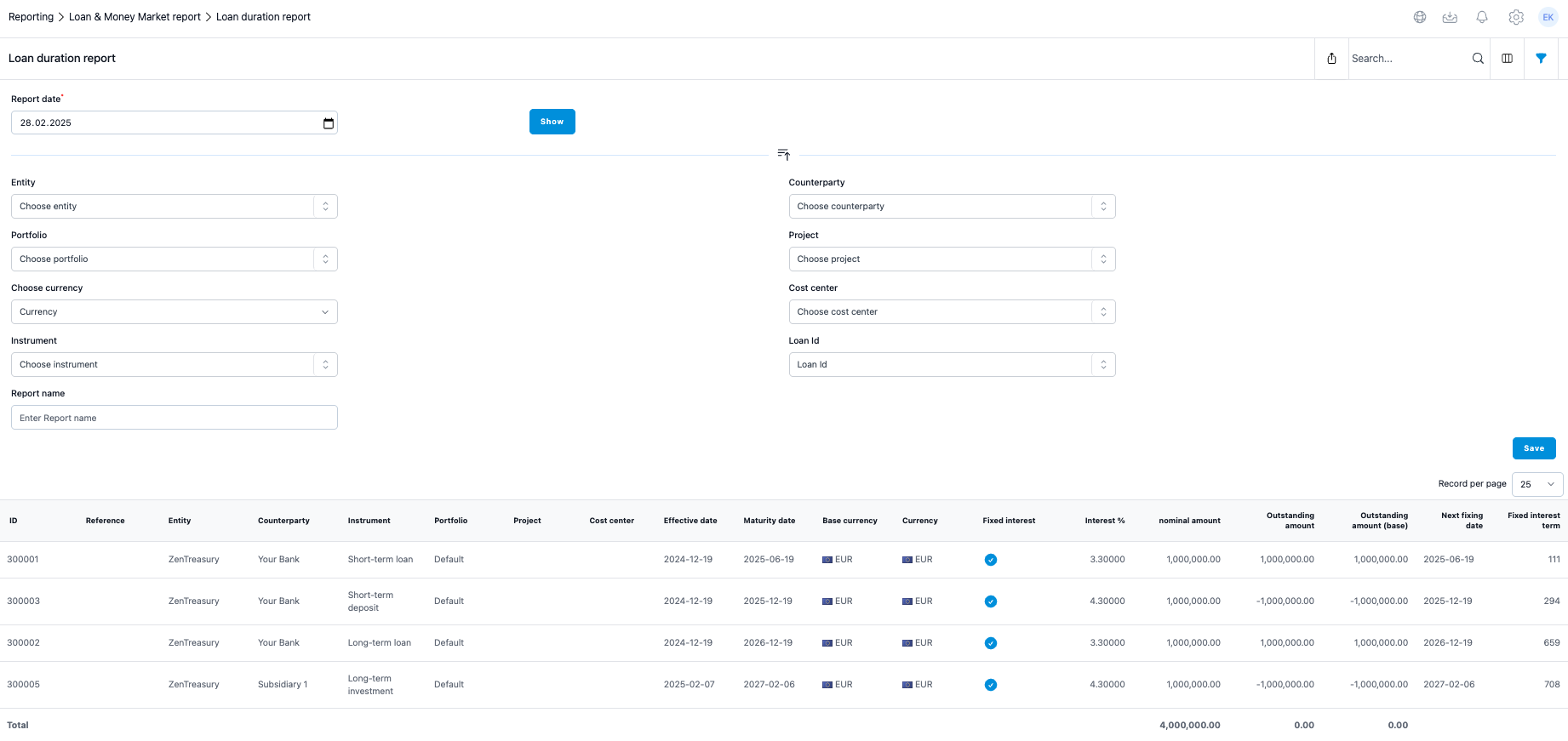
In the Loan duration report you can check for the next interest fixing date for each loan agreement you have in the system. All other fields are the same as in the Loan month end report, except for the last two columns.
Filtering Options:
Filter by entity, portfolio, counterparty or even just loan id for one or several specified loans.
Currency Selection:
Currency selection will translate the loans into the selected currency in the 'in base ccy' fields with the end date market rate, given the currency rate in question is available in Settings > Market data > Foreign Exchange rates.
Column Visibility:
If you prefer to have less columns, you can hide columns under 'Column visibility'. This way you can present only the preferred information in the report and can run more detailed report separately if needed.
Next Fixing date
Fixed Interest Agreements:
For fixed interest agreements the date equals the maturity date of the agreement.
Floating Interest Agreements:
For floating, the system checks from the Interest rate table of the agreements for the last available interest rate. Then, based on that date, the report adds to that the tenor of the reference rate set to the agreement.
Fixed interest term
This involves calculation of the days between the Report date and the Next fixing date.
Was this article helpful?
That’s Great!
Thank you for your feedback
Sorry! We couldn't be helpful
Thank you for your feedback
Feedback sent
We appreciate your effort and will try to fix the article