This report calculates the valuation to your loan/investment. Calculation methods are explained in the instrument settings in Settings > Instruments > Debt types.
Scope of report: This report automatically includes all agreements with a BOND instrument type and any other loan agreements where the 'Calculate valuation' tab on the ADDITIONAL page is activated.
Report basis: The report lists all loans and calculates the valuation based on the report date.
Currency conversion: Currency selection will translate the loans into the selected currency with the end date market rate, given the currency rate in question is available in Settings > Market data > Foreign exchange rates.
Filtering options: Various filtering options are available for the report including entity, portfolio, counterparty or loan ID.
Handling Missing Market Data
If the report encounters missing market data necessary for valuation calculations, it will display a notice message saying: Rates not found to calculate valuation for loan (ID no).
To resolve this:
Either add Market valuation for a bond into the Securities table, or if you are calculating the valuation with the discounted cashflow method (DC-method), add it into the Money Market Rates table.
In some cases, where you are calculating the valuation with the discounted cashflow method and you assume that you have all MM rates but the notice still shows, it might be that you have, for example, a rate 5 Y tenor but the last interest payment for that loan is 5 Y + one day. Then, the system is not able to calculate the valuation correctly. You need an MM rate for a tenor with a closer report date than any of the loan payments; and also, one rate for a tenor after the final payment of the loan.
Customizing Column Visibility
There are several columns on the report. If you prefer to have less columns, you can hide columns under 'Column visibility'. This way you can present only the preferred information on report and can run more detailed report separately if needed.
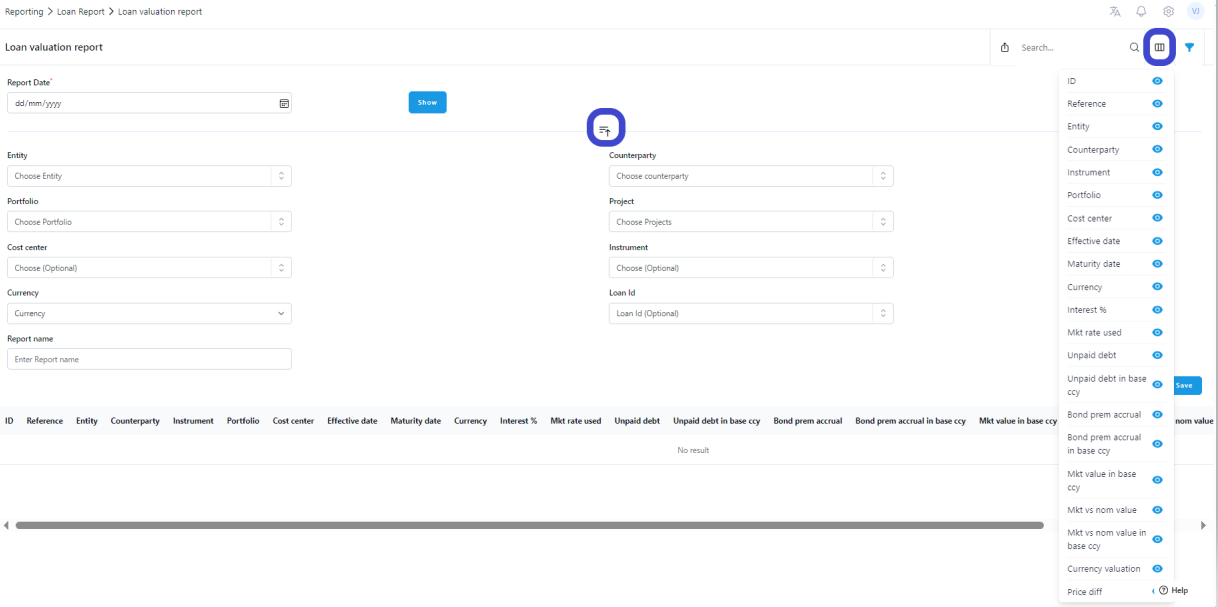
Interest %:
Current interest rate for the loan/investment used for the interest calculation.
Market rate used:
The rate used for the valuation calculation. If you are calculating the valuation with the DC-method, the system will calculate an average of the rates used. It is not a balanced average, so it doesn't give you exactly the correct rate. But you will see the ball park rate used for the calculation.
Unpaid debt amount in currency:
The outstanding balance of the instrument at the Report date in the agreement currency.
Unpaid debt amount in base currency:
The outstanding balance of the instrument at the Report date in the entity´s base currency converted with the report date FX rate.
Bond premium accrual in currency:
This comes if you have a bond instrument and if you have a "Price" value other than 1,00. If that is the case, you need to amortize income/cost into your accounting. You have two options:
- "Straight line method" means that you amortize the price difference on a straight line basis over the whole loan term.
- "Effective interest rate method" means that you amortize the difference using an effective interest method.
Bond premium accrual in base currency:
This comes if you have a bond instrument and if you have a "Price" value other than 1,00. In this case, you need to amortize the income/cost into your accounting. You have two options:
- "Straight line method" means that you amortize the price difference on a straight line basis over the whole loan term.
- "Effective interest rate method" means that you amortize the difference using an effective interest method. The value will be converted to the entity´s base currency using report date FX rate.
Market value in currency:
The market value for the instrument calculated with the method chosen either in instrument settings or for bonds in agreement, in agreement currency.
Market value in base currency:
The market value for the instrument calculated with the method chosen either in instrument settings or for bonds in agreement, in entity base currency.
Market value vs nominal value in currency:
Here we compare the unpaid debt amount and market value in currency columns and see what is the total valuation difference between the two values.
Market value vs nominal value in base currency:
Here we compare the unpaid debt amount and market value in base currency columns, and see what is the total valuation difference between the two values.
Currency valuation:
If the agreement and entity´s base currency are not the same, we split the currency part of the valuation. For the DC-method we calculate the DC-valuation with the balanced FX rates and report day FX rate and then compare the two values.
Price difference:
If the agreement currency and entity´s base currency are the same, then the Price difference = Total valuation. If not, then this is the Total valuation - Currency valuation.
Was this article helpful?
That’s Great!
Thank you for your feedback
Sorry! We couldn't be helpful
Thank you for your feedback
Feedback sent
We appreciate your effort and will try to fix the article